


AI Hairstyle Try On & Color
4.056.00 Reviews
App Specs
- Version
- 1.6.5
- Updated On
- License
- Free
- Downloads
- 50,000+
- Developer
- Nextdio
- Categories
- Art & Design
- Platform
- Android
Screenshots
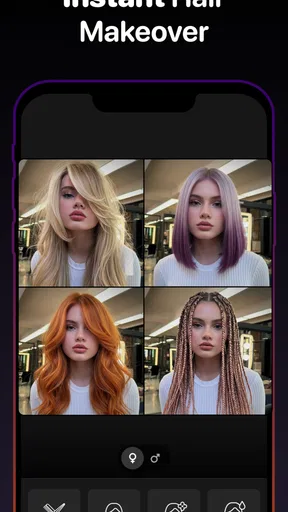
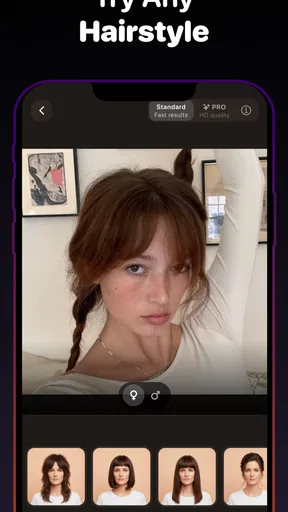
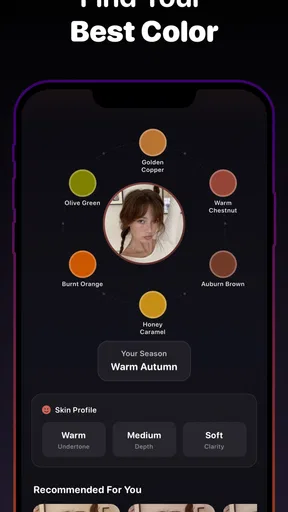
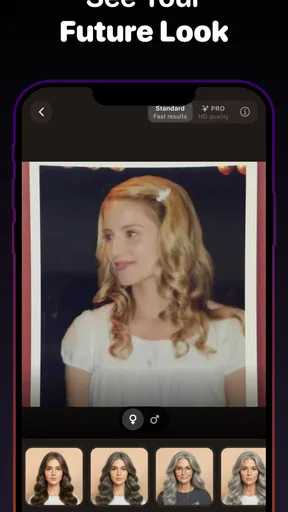
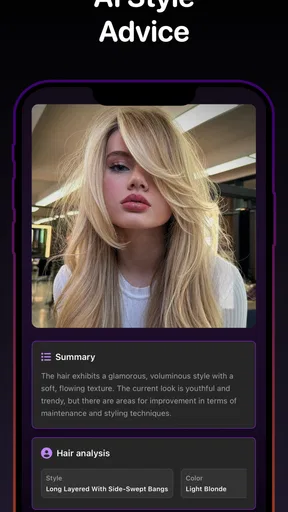
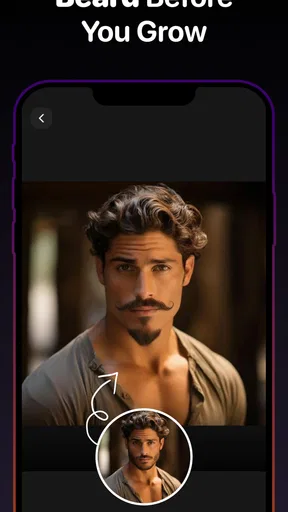
 Analysis by AppCompare
A hairstyle preview can be useful long before you book a salon appointment, especially when you’re unsure whether a dramatic cut will suit you or a new color will feel like you. AI Hairstyle Try On & Color gives me a low-stakes place to explore those possibilities on a phone. I’d treat the results as conversation starters rather than promises of exactly what a stylist can create, but that still makes the app handy when I want to narrow down my ideas.
What to expect when you open it
This is a free art-and-design app from Nextdio, with optional in-app purchases priced from $0.99 to $39.99 per item. It has a 4.0 average from around 2,800 ratings, and more than 50,000 installs. The app is rated for Everyone, runs on Android 7.0 or later, and its current version is 1.6.5. Those details make it easy to judge whether it fits your device and budget: you can start without paying, while some extras may involve a purchase.
For a useful first session, I’d choose a clear, front-facing photo with the hairline visible and the face evenly lit. That gives the virtual styles a better chance of lining up naturally. If you’re comparing cuts, use the same photo for each option; otherwise, changes in angle or lighting can make it harder to tell whether the hairstyle itself is the difference you like.
When an internet connection matters
The app’s main appeal is its AI-powered preview, so I’d plan to have a reliable connection when opening it and working through looks. Network conditions can shape how quickly an image-based experience responds, and a weak connection may make the process feel less fluid. I’d avoid starting a serious comparison while rushing between places or relying on a patchy signal; a calm session at home is more likely to let you focus on the choices.
That matters most when you’re trying several cuts or colors in a row. Rather than treating every preview as a separate decision, I’d pick a small set of realistic options first, then compare them side by side. This keeps the session focused and makes it easier to spot a pattern, such as preferring shoulder-length shapes even when the colors change.
Using it in everyday situations
A realistic time to use the app is before a haircut you’ve been postponing. You might be thinking about taking off length but not know whether to ask for a bob, layers, or a shorter crop. Trying a few directions can help you explain what you like and, just as importantly, what you don’t. I’d bring the images to a stylist as references, while staying open to their advice about what will work with your hair and routine.
It can also help when you’re considering color for an event or a seasonal change. Testing a bolder shade virtually lets you decide whether you enjoy the overall impression before committing to a salon process. The preview won’t settle practical questions such as upkeep or how a color will behave on your own hair, but it can help you arrive with a clearer idea of the mood you want.
Worth Reading Before You Choose

EA SPORTS FC Mobile 26 Is a Bigger Football Game, but It Takes Time

Flipboard Shows What News Apps Must Do Beyond the Feed

Switching to Android Auto Means Rethinking Your Driving Routine

Google Calendar Makes a Crowded Week Easier to Manage

Ludo King Makes the Most of the Minutes Between Plans

Baby Panda World Brings Quick Play to Modern Phones, but Its Game Library Feels Busy
Where the preview has limits
Virtual hair is a guide, not a fitting. A photo-based result can’t fully capture how your hair moves, its density, its natural curl pattern, or the work needed to achieve a particular shade. I wouldn’t use a convincing image as proof that a cut will fall exactly that way in real life. For a major change, the best use is to show a stylist the silhouette or color direction you’re drawn to and discuss what is achievable.
Photo choice is another trade-off. A selfie that hides the hairline, has strong shadows, or is taken at an unusual angle can make comparisons less useful. If the first result looks off, I’d try a clearer picture before deciding the app’s idea of a style is a poor match. Keeping the source photo consistent also makes saved options more meaningful when you revisit them later.
Who will get the most from it
I think it suits curious people who like visual decision-making, especially anyone weighing several haircut shapes or color directions before speaking with a stylist. It can also be fun for a casual makeover session with a friend, as long as you treat the images as playful inspiration rather than a guarantee. If you already know exactly what you want, or need technical advice about coloring, a consultation with a professional is the better next step.
Compared with browsing hairstyle photos or mood boards, the advantage here is seeing options against your own face instead of trying to imagine the fit from someone else’s picture. A regular photo editor may be better for precise manual adjustments, while a stylist can assess your hair in person. This app sits between those approaches: it helps you explore, but it doesn’t replace either expert advice or careful editing.
First Impressions and User Interface
When I first opened the AI Hairstyle Try On & Color app, I was greeted with a sleek and modern design. The interface is super intuitive, making it easy to navigate even if you’re a newbie. You get a seamless experience right from the get-go, with clear options and minimal clutter. It’s like walking into a salon where everything is perfectly organized.
The app gives you a quick tutorial on how to snap a perfect selfie to get started. Trust me, following their tips is key to getting the best results. The app guides you through every step with helpful hints and tips, so you’re never left hanging.
Trying On Hairstyles
This is where the magic happens! You can try on hundreds of hairstyles with just a tap. Whether you're thinking of going for a chic bob or a daring pixie cut, the options are endless. The app uses advanced AI technology to make the hairstyles look incredibly realistic. You can move your head around, and the hairstyle stays put – it’s like you actually have it on! No more guessing games; you can see exactly how you’ll look with that new ‘do.
I had a blast trying different looks and even found some styles I hadn’t considered before. It’s a great way to experiment without any commitment. Plus, you can save your favorite looks to revisit later or show them to your hairstylist. It’s like having a Pinterest board, but way cooler.
Coloring Fun
If you’ve ever thought about coloring your hair but were too scared to take the plunge, this feature is for you. The app allows you to try out a range of hair colors, from natural shades to vibrant, out-there hues. I had a lot of fun playing around with colors I’d never dare try in real life, like electric blue and fiery red.
The color application is smooth and blends well with your hair’s natural look. The AI does an impressive job of maintaining the texture and shine of your hair, making the color appear more realistic. It’s a fantastic way to see how different shades complement your complexion before making any permanent changes.
Additional Features
The app also offers some cool extras, like tips on hair care and styling. It’s like getting advice from a professional stylist right at home. There are tutorials on how to achieve certain looks and even product recommendations tailored to your hair type. It’s these little touches that make the app more than just a fun tool – it’s a comprehensive hair care assistant.
There’s also a social aspect where you can share your looks with friends or on social media. It’s a fun way to get feedback and maybe even inspire others to try something new. Plus, who doesn’t love a good hair transformation post?
Keeping a session useful
To get more than a quick laugh out of the previews, I’d make the session a small decision-making exercise. Start with the actual change you’re considering—length, shape, or color—and avoid changing all three at once. If you test a new cut and a vivid shade together, it becomes difficult to tell which part of the look appeals to you. Separating those choices gives you a more useful reference for a salon conversation.
There’s also a practical reason not to generate an endless parade of options: too many similar images can blur together. I’d save only the few that genuinely stand out, then compare them after a short break. A compact set is easier to discuss with a stylist and more likely to reveal what you consistently prefer, whether that’s a softer fringe, more length around the face, or a warmer-looking color.
Sharing choices without losing perspective
Getting a friend’s reaction can be helpful, but I wouldn’t let a quick vote make the decision for me. People may respond to the color or the novelty of a dramatic cut rather than whether it suits the way I want to look day to day. When I share a preview, I’d ask a focused question—such as which shape feels more like me—instead of asking for a general verdict. That tends to produce feedback I can actually use.
If you plan to show a saved image at an appointment, explain what you want the stylist to notice. The length, fringe, overall outline, and color mood are different reference points, and a single preview may not translate literally to your hair. A stylist can help adapt the idea to your texture and maintenance preferences; the image is most useful as a way to get that conversation started.
When the phone is not the right setting
A small screen is convenient for experimenting, but it can make subtle differences harder to judge. I wouldn’t make a major color decision from a quick glance outdoors, where changing light can alter how a shade appears. If a preview matters to a real appointment, look at it in steady lighting and take time to compare it with your original photo. That simple pause can stop a playful filter-like impression from becoming an overconfident plan.
The same applies when you’re in a hurry. If a preview takes longer to respond because your connection is unreliable, it’s better to return to it later than to rush through choices and save images you don’t really like. A stable connection and a few minutes of attention make the app feel more useful; neither can turn a virtual result into a guarantee, but they make the comparison fairer.
Privacy-minded habits and purchases
Since the experience is built around personal photos, I’d choose images thoughtfully and share only the results I’m comfortable showing to other people. For feedback, sending one selected preview is usually more purposeful than posting every experiment. That keeps the conversation focused and gives you more control over which versions of your look become public.
The app is free to start, but optional purchases range from $0.99 to $39.99 per item, so I’d explore the experience before paying for anything. Decide what you actually want from a session first: if you only need a few references for an upcoming cut, a paid extra may not be necessary. If you are considering a purchase, check what it unlocks in the app before confirming, rather than assuming every feature is included in the free experience.
Who may prefer another approach
I’d skip this as a decision tool if you need a reliable prediction of how a complex color process will turn out, or if you want detailed, personalized hair-care guidance before changing your routine. A virtual preview can help communicate a direction, but it cannot inspect your hair or account for every step involved in reaching a target shade. In those cases, a stylist’s assessment is more valuable than another round of simulated options.
Likewise, people who prefer to control every edit by hand may be happier with a conventional photo editor, while someone who mainly wants inspiration can browse reference photos without using their own selfie. The strength of this app is the personal try-on angle. If that is not important to you, another method may feel simpler and give you more control over the result.
Final Thoughts
Overall, the AI Hairstyle Try On & Color app is a must-have for anyone looking to experiment with their look. Whether you’re planning a big change or just want to have some fun, this app has you covered. It’s easy to use, packed with features, and above all, it makes trying on new hairstyles and colors a breeze.
So, if you’re itching for a new look but still on the fence, give this app a try. It might just be the push you need to confidently rock that new hairstyle. And remember, with this app, every day is a good hair day!
My connectivity verdict
For me, the best way to use this app is as a connected, unhurried visual notebook: choose a clear photo, test a few distinct ideas, and save only the references that help you explain what you want. Its appeal is the chance to explore cuts and colors on your own image, while its limits are the usual ones of a digital preview—and the extra friction a weak connection can bring. I’d recommend it to anyone who enjoys comparing looks before a salon visit, but I’d keep a stylist’s practical advice in the final decision.
Pros
- Realistic hairstyle simulation.
- Wide variety of styles and colors.
- Easy to use interface.
- Fast processing of images.
- Regular updates with new styles.
Cons
- Limited free features.
- Requires internet connection.
- Can struggle with complex hairstyles.
- Ads can be intrusive.
- Occasional app crashes.
FAQs for AI Hairstyle Try On & Color
What features does the AI Hairstyle Try On & Color app offer?
The AI Hairstyle Try On & Color app provides users with a variety of features including virtual hairstyle try-ons, hair color changes, and style recommendations. With advanced AI technology, users can see how different hairstyles and colors look on them in real-time, allowing for an accurate preview before making any changes.
Is the AI Hairstyle Try On & Color app user-friendly?
Yes, the app is designed with user-friendliness in mind. It features an intuitive interface that guides users through the process of selecting hairstyles and colors. Even those who aren't tech-savvy will find it easy to navigate and experiment with different looks, thanks to clear instructions and helpful tips.
Does the app provide realistic results?
The app uses advanced AI algorithms to deliver realistic results. By analyzing facial features and hair texture, the app accurately overlays hairstyles and colors. While no virtual try-on can be 100% accurate, users often find the results closely match real-life outcomes, aiding in decision-making.
Is the AI Hairstyle Try On & Color app available for both Android and iOS?
Yes, the AI Hairstyle Try On & Color app is available for download on both Android and iOS platforms. Users can find it on the respective app stores, ensuring accessibility for a wide range of smartphone users, regardless of their device preference.
Are there any in-app purchases or subscriptions required?
The app offers a range of features for free, but some advanced features or premium hairstyles and colors may require in-app purchases or subscriptions. This allows users to explore basic options at no cost while providing additional customization options for those willing to invest in a premium experience.


